Angular Leaflet Routing
Para este ejemplo debemos primero instalar lo necesario para poder trabajar con Leaflet en Angular o Ionic + Angular
npm install leaflet leaflet-routing-machine leaflet-gesture-handling
Añadimos el CSS necesario en el archivo index.html
<link rel="stylesheet" href="./assets/css/leaflet-gesture-handling.min.css" type="text/css">
<link rel="stylesheet" href="./assets/css/leaflet-search.css" type="text/css">
<link rel="stylesheet" href="./assets/css/leaflet-distance-marker.css" type="text/css">
<link rel="stylesheet" href="./assets/css/leaflet-routing-machine.css" />
Y luego del body añadimos los scripts externos, esto porque al usar los paquetes npm de estas librerias no me funcionaba por lo que la version cdn si funciona.
<script src="./assets/js/leaflet-geometryutil.js"></script>
<script src="./assets/js/leaflet-distance-marker.js"></script>
Hecho esto creamos un componente con el comando:
ng generate component simpleRouting
Luego de eso en el archivo HTML creamos un elemento "div" que contenga el mapa.
<div [id]="id" [class]="className"></div>
Ahora si podemos concentrarnos en el archivo typescript Primero debemos importar todo lo necesario para el ejercicio, en este caso las librerias de leaflet, un servicio para obtener la ubicación actual, un servicio que entrega un marcador personalizado, y una interfaz para el tipado de typescript.
import 'leaflet';
import 'leaflet-routing-machine';
import { Component, OnInit, Input } from '@angular/core';
import { MapService } from "src/app/services/map.service";
import { LocalizationService } from "src/app/services/localization.service";
import { GestureHandling } from "leaflet-gesture-handling";
import { environment } from 'src/environments/environment';
import { IUbication } from "src/app/interfaces/models";

declare let L: any;

@Component({
    selector: 'simple-routing-map',
    templateUrl: './simple-routing-map.component.html',
    styleUrls: ['./simple-routing-map.component.scss'],
})
export class SimpleRoutingMapComponent implements OnInit {
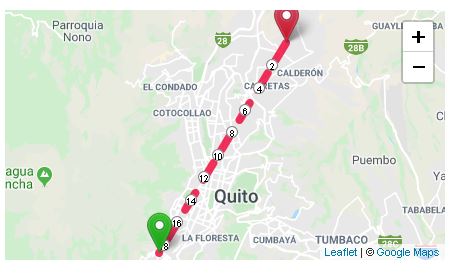
Hecho esto en la clase especificamos algunos parámetros o propiedades que tendrá el componente como el id, la clase, el nivel de zoom, las coordenadas de destino, habilitar los gestos del mapa y la opción de manejar la ruta con una polilinea o con leaflet routing machine
    @Input() id: string;
    @Input() className = '';
    @Input() zoom = 16;
    @Input() destinationCoords: IUbication;
    @Input() enableGesture = false;
    @Input() usePolyline = true;
Hecho esto las demas variables que usamos son para guardar la polilinea, el mapa, la capa de marcadores, la coordenada actual, el array de coordenadas para el enrutamiento y para saber si el mapa ya cargo.
    polylineRoute: any;
    map: any;
    mapMarkers: any[] = null;
    mapIsLoaded = false;
    markersLayer = new L.LayerGroup();
    currentCoordinate: any = null;
    routeControl: any;
    arrRoutesLatLng = [];

    constructor(
        private mapService: MapService,
        private localizationService: LocalizationService
    ) {

    }

    async ngOnInit() { }
Ejecutamos el código en el ciclo "AfterViewInit" para evitar problemas de renderización. Primero obtenemos los marcadores disponibles, luego esperamos que el servicio de localización me devuelva mis coordenadas actuales y al final inicializamos el mapa.
    async ngAfterViewInit() {
        // Obtener marcadores
        this.mapMarkers = await this.mapService.getMarkers().toPromise();
        // Obtener Coordenadas
        this.currentCoordinate = await this.localizationService.getCoordinate();
        // Inicializar el Mapa
        await this.initializeMap();
    }
En esta función habilitamos/deshabilitamos los gestos del mapa. Luego seteamos el valor de las coordenadas para el enrutamiento, creamos el mapa, le agregamos algunos eventos y configuramos la capa del Mapa. Luego añadimos los marcadores en el mapa y al final realizamos el enrutamiento sea con una polilinea o con el routing de Leaflet Routing Machine.
    async initializeMap() {
        if (this.enableGesture) {
            L.Map.addInitHook("addHandler", "gestureHandling", GestureHandling);
        }
        //Setear las Coordenadas de tipo LatLng
        this.arrRoutesLatLng[0] = this.createLatLng(this.currentCoordinate.latitude, this.currentCoordinate.longitude);
        this.arrRoutesLatLng[1] = this.createLatLng(this.destinationCoords.latitude, this.destinationCoords.longitude);
        // Crear el Mapa
        this.map = L.map(this.id, {
            gestureHandling: this.enableGesture,
            zoomAnimation: true,
            markerZoomAnimation: true,
            zoomControl: true
        });
        // Agregar Evento al Mapa cuando esta cargado
        this.map.on('load', (e: any) => {
            this.mapIsLoaded = true;
            // Invalidar Tamanio
            this.map.invalidateSize();
        });
        this.map.zoomControl.setPosition('topright');
        // Configurar la vista centrada
        this.map.setView([-0.1548643, -78.4822049], this.zoom);
        // Agregar la capa del Mapa
        L.tileLayer(environment.mapLayers.google.url, {
            attribution: environment.mapLayers.google.attribution,
            maxZoom: 18,
            updateWhenIdle: true,
            reuseTiles: true
        }).addTo(this.map);
        //Añadir la Ruta en caso de ser necesario
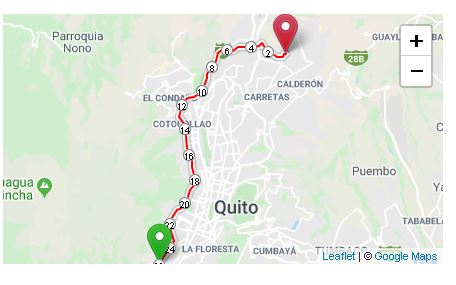
        if (!this.usePolyline) {
            this.setRoutingMachine(this.arrRoutesLatLng);
        }
        this.map.addLayer(this.markersLayer);
        // Si obtuve coordenadas añadir el marcador
        if (this.currentCoordinate) {
            const iconCurrent = await this.mapService.getCustomIcon('red');
            let currentPoint: any;
            this.arrRoutesLatLng[0] = this.createLatLng(this.currentCoordinate.latitude, this.currentCoordinate.longitude);
            if (iconCurrent) {
                currentPoint = new L.Marker(this.arrRoutesLatLng[0], { icon: iconCurrent, title: 'Mi Posición Actual' });
            } else {
                currentPoint = new L.Marker(this.arrRoutesLatLng[0], { title: 'Mi Posición Actual' });
            }
            currentPoint.bindPopup('Mi Ubicación Actual').openPopup();
            this.markersLayer.addLayer(currentPoint);
        }
        //Añadir el destino final
        let punto = null;
        const markerIcon = await this.mapService.getCustomIcon('green');

        if (markerIcon) {
            punto = new L.Marker(this.arrRoutesLatLng[1], { icon: markerIcon });
        } else {
            punto = new L.Marker(this.arrRoutesLatLng[1]);
        }
        // Añadir el punto a la capa de marcadores
        this.markersLayer.addLayer(punto);
        //Añado la polilinea de ser necesario
        if (this.usePolyline) {
            this.addPolyline(this.arrRoutesLatLng);
        }

    }
Esta función sirve para añadir la polilinea al mapa pasandole como parámetros el array de coordenadas y al final centramos el mapa.
    addPolyline(arrayCoordsLatLng: any) {
        this.polylineRoute = L.polyline(arrayCoordsLatLng,
            {
                color: '#ee0033',
                weight: 8,
                opacity: .8,
                dashArray: '20,15',
                lineJoin: 'round'
            }
        );
        //Añadir Ruta Polyline
        this.markersLayer.addLayer(this.polylineRoute);
        this.map.fitBounds(this.polylineRoute.getBounds());
    }
Esta función añade la ruta con Leaflet Routing Machine usando como Router el Api de Mapbox para evitar el limite de ORSM.
    setRoutingMachine(arrCoords: any) {
        this.routeControl = L.Routing.control({
            waypoints: arrCoords,
            show: false,
            routeWhileDragging: false,
            router: new L.Routing.mapbox(environment.mapBoxApiKey),
            createMarker: function () { return null; }
        });
        this.routeControl.addTo(this.map);
    }
Esta función sirve para actualizar las coordenadas de la ruta.
    updateRouteCoords(arrCoords: any[]) {
        this.routeControl.setWaypoints(arrCoords);
    }
Esta función crea un array LatLng con Leaflet.
    createLatLng(latitude: number, longitude: number) {
        return L.latLng(latitude, longitude);
    }
}
Nota
Si desean probar este código pronto espero subirlo en Stackblitz pero ustedes mismo pueden probarlo creando un entorno, es gratis y sirve mucho para no usar los recursos de su PC.
Para llamar al componente lo haces de la siguiente manera:
 <simple-routing-map [zoom]="11" className="public-service-map"
            id="public-service-map-detail"
            [destinationCoords]="coordsArr" [usePolyline]="false"></simple-routing-map>
Imágenes
About the author
I have worked as a frontend and backend developer handling technologies such as Django, Ionic, Laravel, MySQL, Spring (Java), Oracle, NodeJS, Angular, VueJS with the goal of developing websites and mobile applications that offer high performance and are interactive.
You can learn more about me by visiting my website: www.stalinmaza.com
#frontend #backend #fullstack #javascript #nodejs #php
Comments
Join the discussionMuchísimas gracias por tu aporte!!! Justo en estos días me ha venido de lujo, estoy desarrollando una idea propia y de verdad que te agradezco este artículo. Es que hay muy poco material de leaflet para Ionic 5. Me paso más horas investigando que picando código. te agradecería si me dijeras donde husmear más. Hay cosas básicas, pero por ejemplo, ahora llevo casi 4 horas intentando capturar el valor de cuando cambia el zoom.. y mira que cuesta!1 ni en la web oficial de LeafLet hacen mención a como usarlo en TS para ionic.
Gracias amigo igual como tu, paso varias horas probando e investigando porque no hay muchos ejemplos usando Leaflet pero cualquier cosa extra que sepa, seguro la publicare, saludos.
